Vitalpax Inc.
Quotation Tool CRM
Development Updates
Certificate of Composition + Sample Spec Sheet + Supplement / Nutrition Facts go live, the entire Quote Requests UI gets rebuilt, and the Ingredient Request flow is reimagined end-to-end.
May 13 - May 19, 2026
Section
New Features &
New Features &
Enhancements
Printable CoC, Sample Spec Sheet, Supplement / Nutrition Facts panels, age-banded Daily Values, and a Food / Supplement product type.
Major New Feature
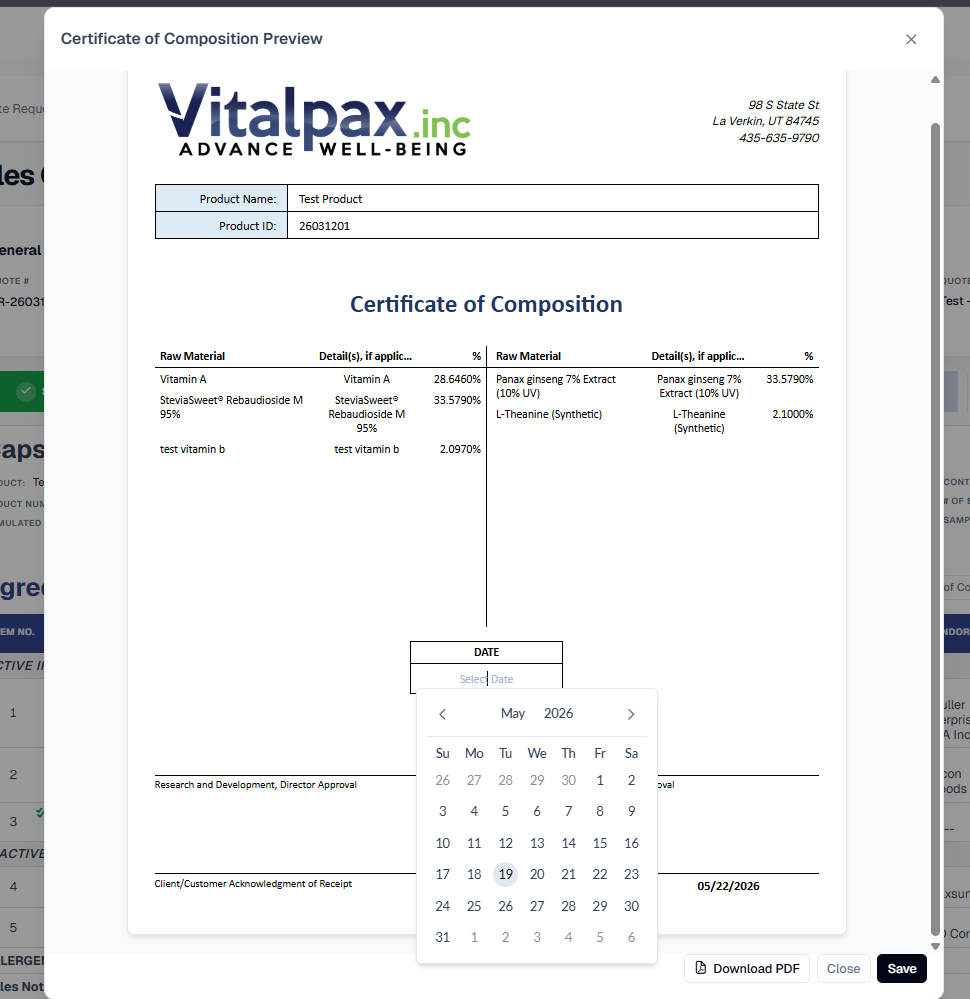
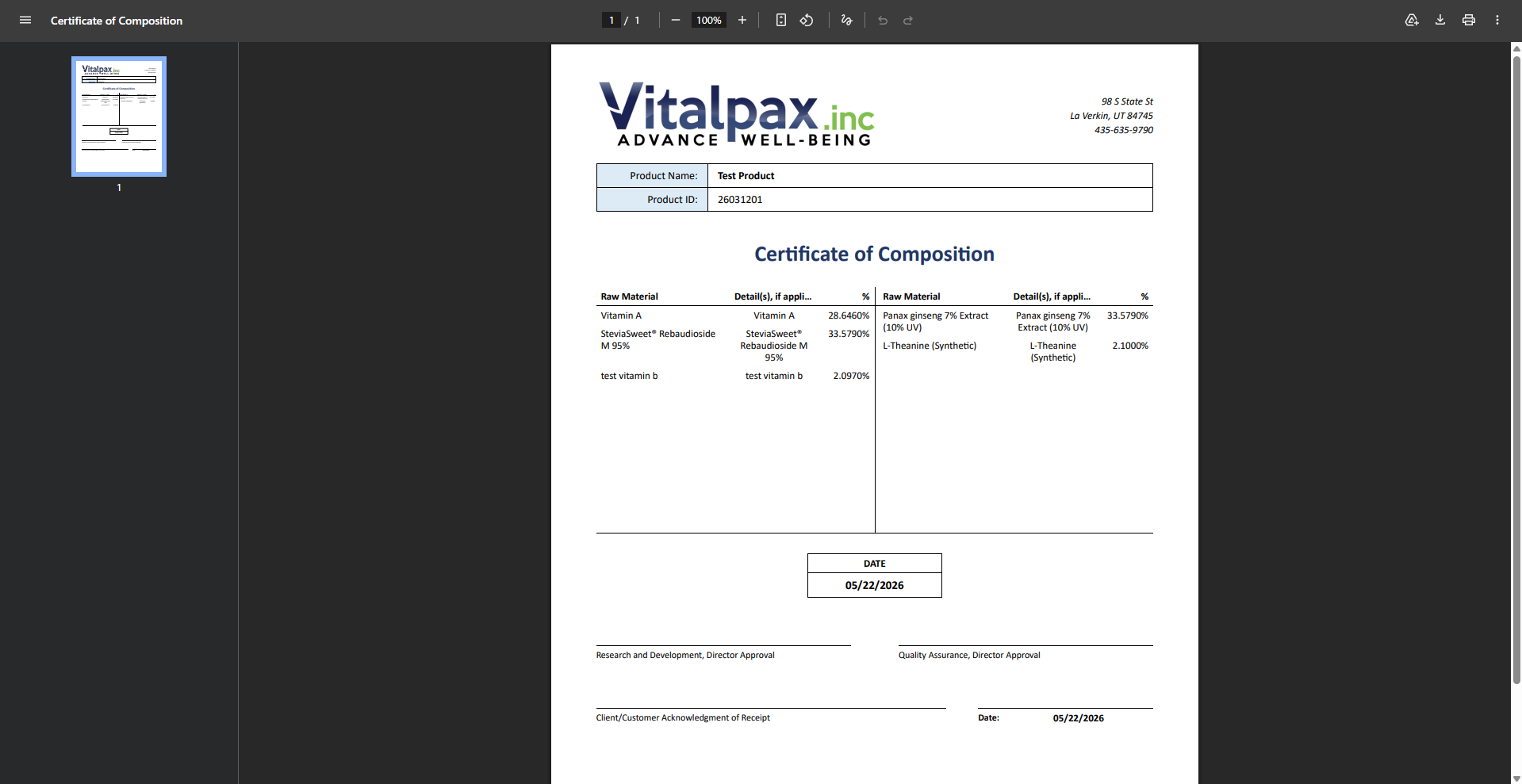
Certificate of Composition Sheet
- Preview + PDF in R&D Tab -- Brand-new Certificate of Composition (CoC) preview with a one-click PDF download lives directly on the R&D tab.
- Active / Inactive Split -- Page automatically separates active ingredients on the left and inactive ingredients on the right with raw material, detail, and percentage columns.
- Dates Saved In Place -- Certificate date and sign-off dates can be set, saved, and re-edited right from the preview - no separate settings screen.
- Standardized Filename -- Downloads come out as clean, high-resolution PDFs with a consistent name and date format ready to send to the customer.
Major New Feature
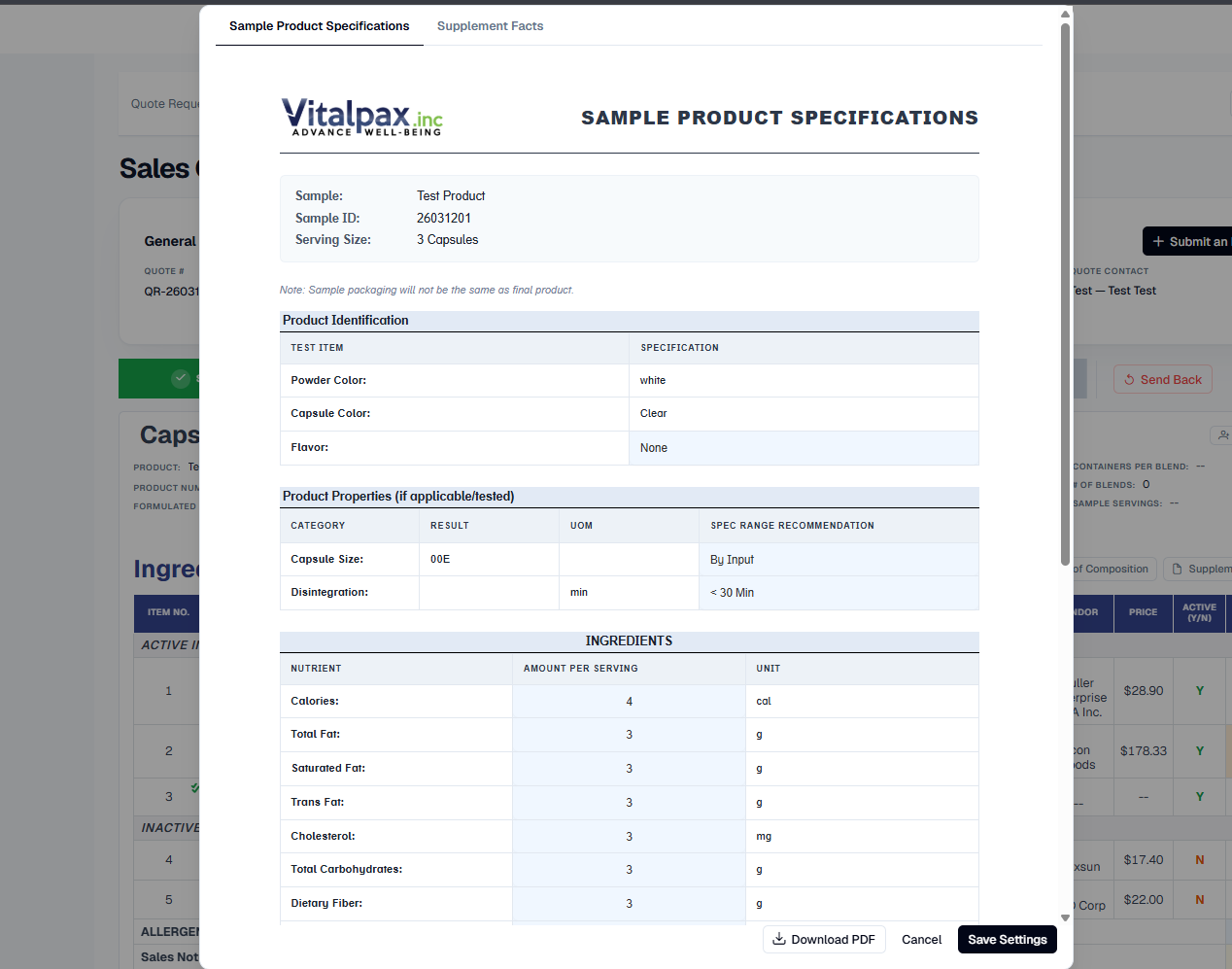
Sample Spec Sheet + Supplement / Nutrition Facts
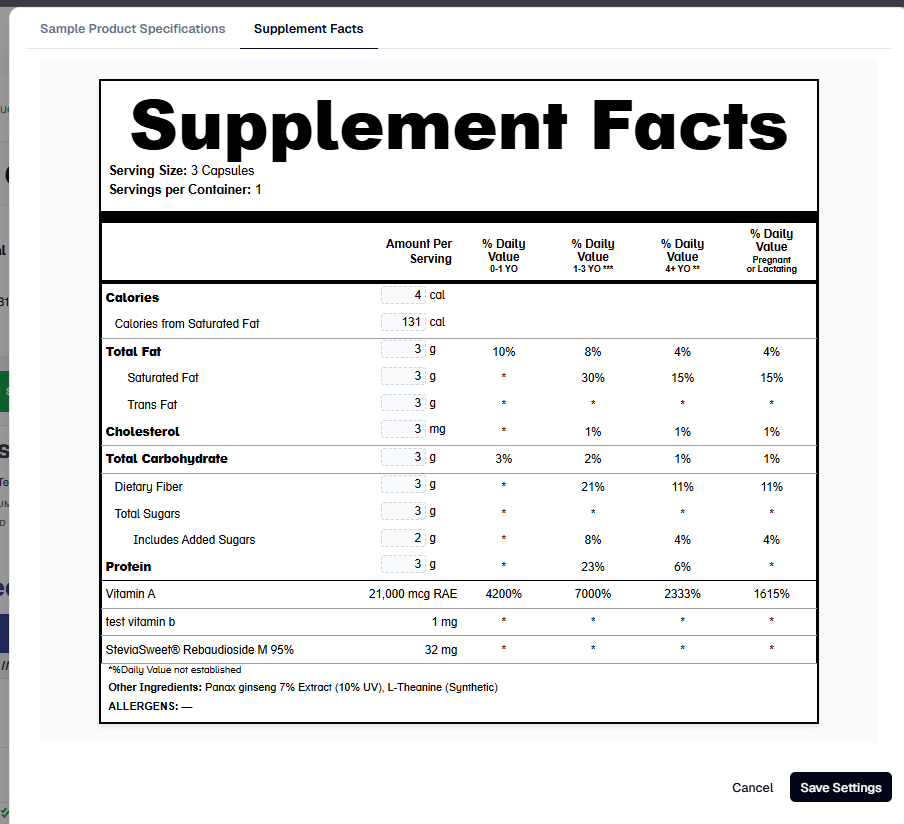
- Two-Tab Lab Preview -- Lab tab now hosts a Sample Product Specifications sheet and an interactive facts panel preview side-by-side in one dialog.
- Dynamic Panel Title -- Header automatically switches between Supplement Facts and Nutrition Facts depending on whether the quote is classified as a supplement or food product.
- Print-Ready PDFs -- Both the Sample Spec Sheet and the facts panel support instant high-resolution PDF download with one click.
- Sign-off Built In -- Sample Spec Sheet also captures Product Development Approval and Sales Approval dates plus customer feedback and approval in one place.
Reference Data Update
Age-Banded Daily Values for %DV Math
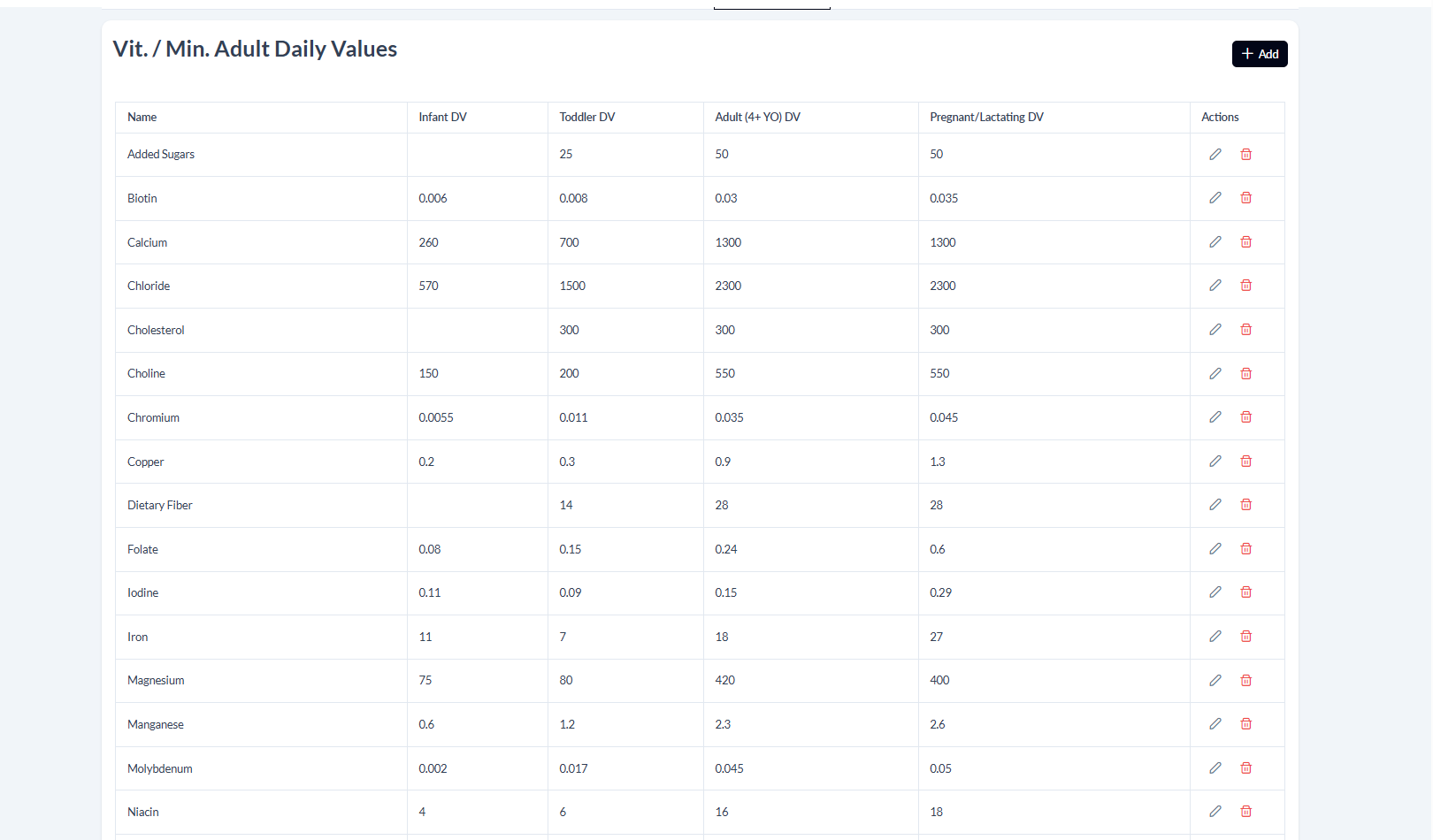
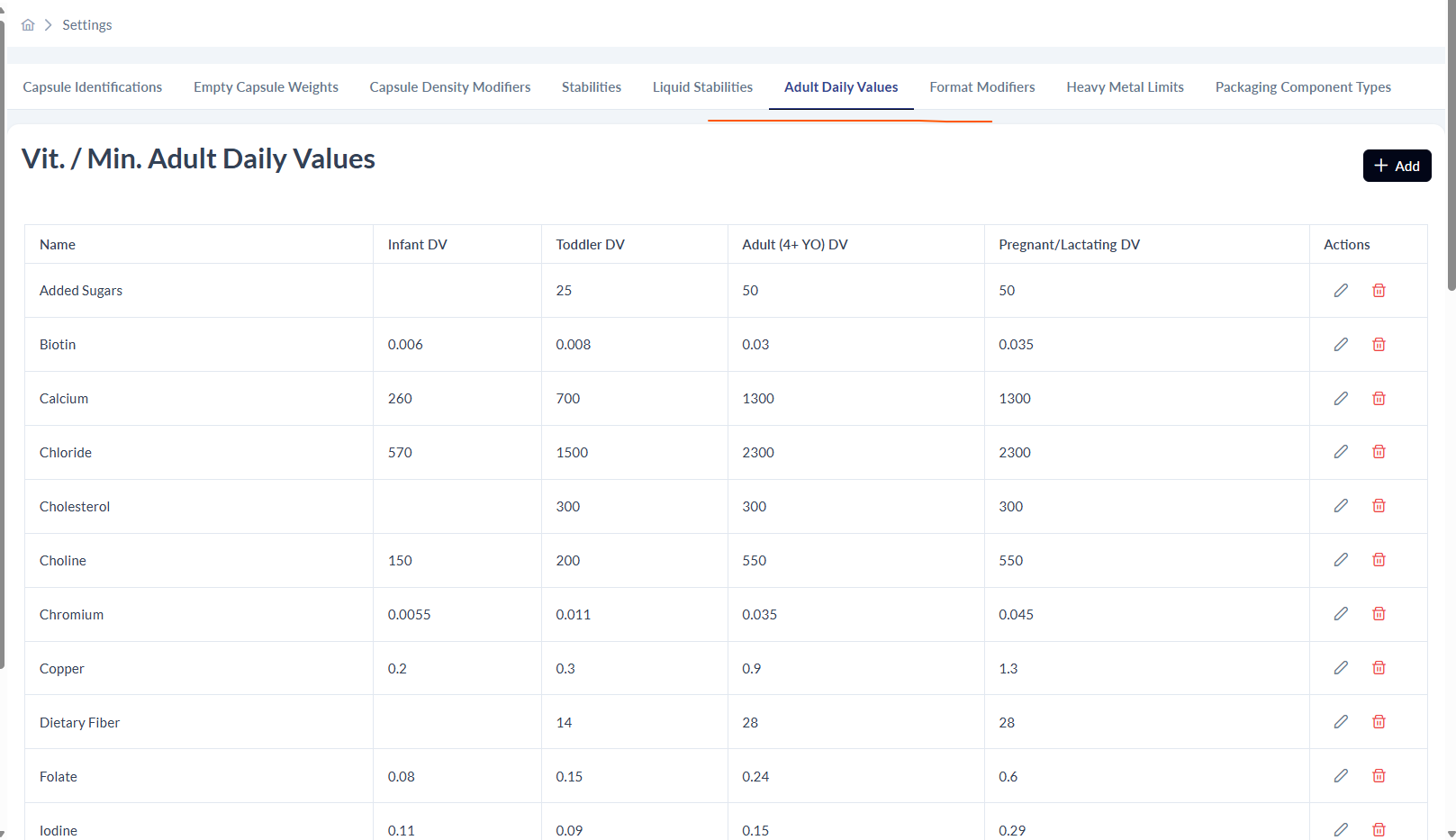
- Wider Year Ranges -- Vit / Min Adult Daily Values table now stores values per age band: Infant DV, Toddler DV, Adult (4+ YO) DV, and Pregnant / Lactating DV.
- Drives the Panels -- This reference data is what the Supplement Facts and Nutrition Facts panels read to auto-calculate the correct % Daily Value for each age column.
- Editable in Settings -- Lives under Settings - Adult Daily Values with inline edit and delete on every nutrient row so ops can keep the master list current.
New Feature
Food vs Supplement Product Type
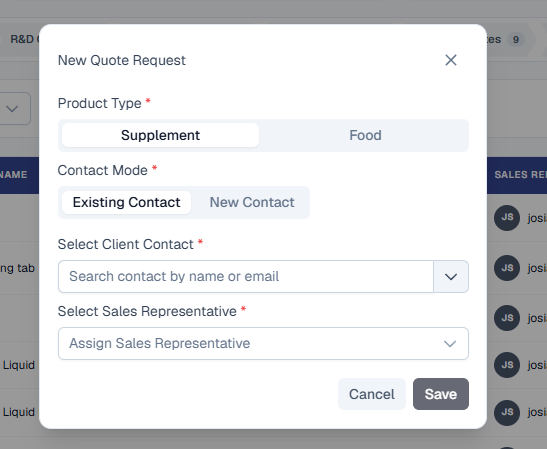
- Pick at Quote Creation -- New Quote Request dialog now opens with a Product Type toggle: Supplement or Food, before Contact Mode and assignment fields.
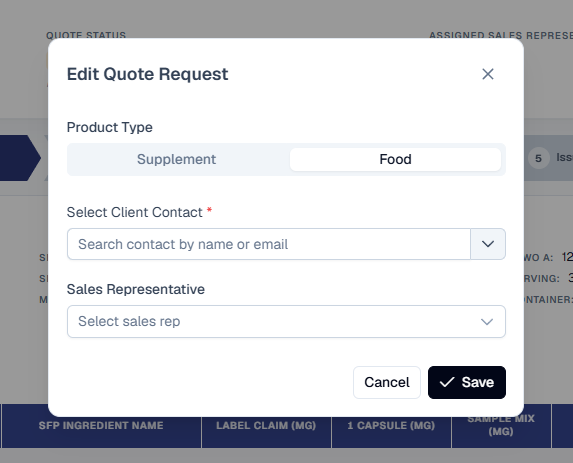
- Editable Later -- Edit Quote Request dialog carries the same Supplement / Food selector so the classification can be changed mid-quote if needed.
- Drives the Right Panel -- Classification determines whether the Nutrition Facts panel (Food) or Supplement Facts panel (Supplement) is shown and generated for that quote.
Section
Frontend UI
Frontend UI
Overhaul
Quote Requests list, per-tab content, Lab Settings dialog, Ingredient Requests list, and the Ingredient Request detail flow all rebuilt from scratch.
UI / UX
Formula Settings as Page Tabs
- From Side Nav to Tabs -- Consolidated Formula Settings from the side navigation into a clean horizontal tabbed page (Capsule Identifications, Empty Capsule Weights, Capsule Density Modifiers, Stabilities, Liquid Stabilities, Adult Daily Values, Format Modifiers, Heavy Metal Limits, Packaging Component Types).
- Simplified Labels -- Tab labels shortened so they no longer get truncated on smaller screens.
- Clear Active Indicator -- Active tab gets an underlined orange highlight so the current workspace is unambiguous.
UI / UX
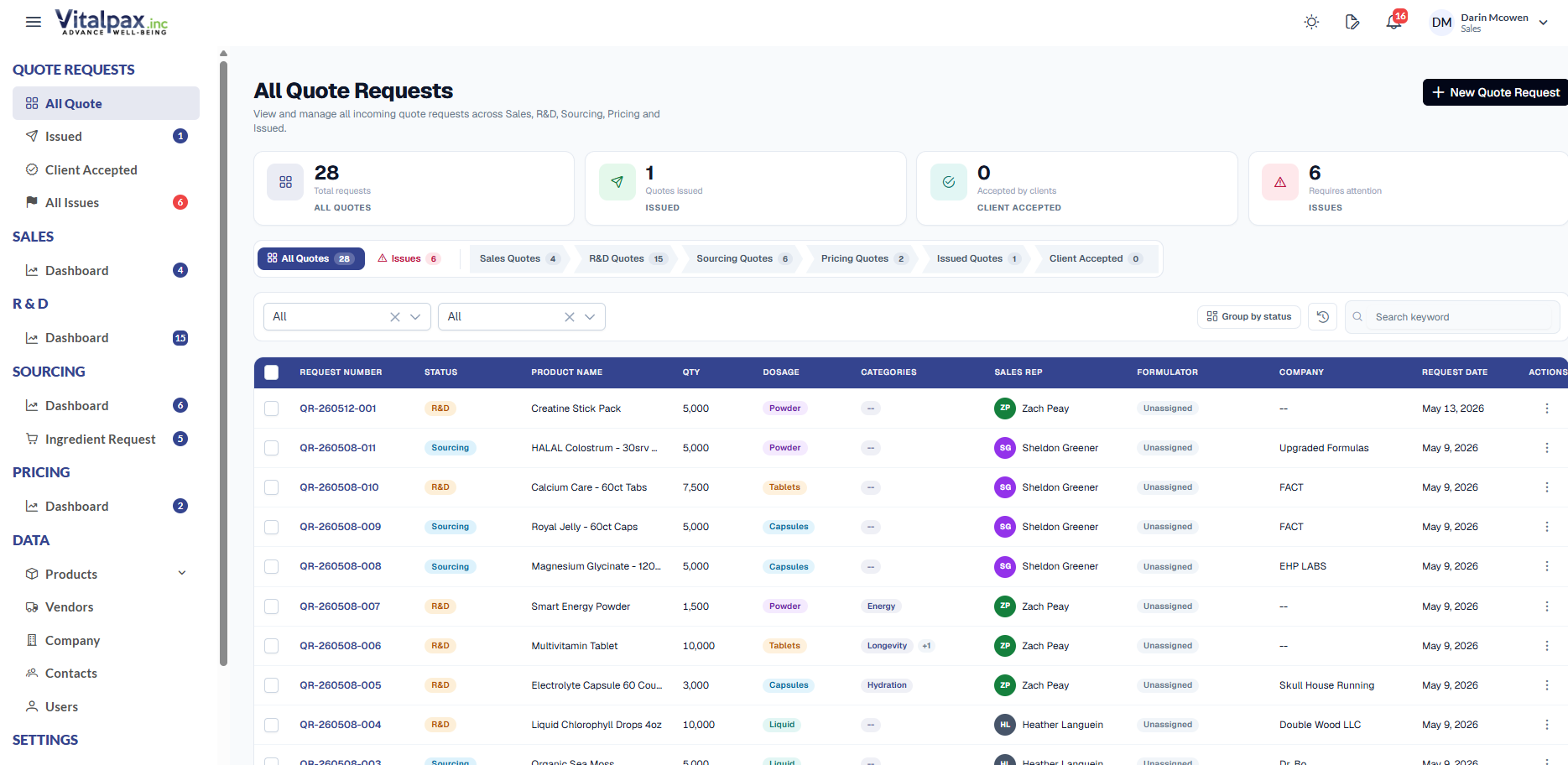
Quote Requests List - Full Redesign
- Arrow-Pill Status Tabs -- New top tab strip with arrow-shaped pills: All Quotes, Issues, Sales, R&D, Sourcing, Pricing, Issued, C-Accepted (shortened so it always fits).
- Quick-Glance Stat Cards -- All Quotes / Issued / Client Accepted / Issues cards at the top keep accurate counts no matter which tab is active.
- Server-Side Tab Loading -- Each tab fetches only what it needs from the server, so the page stays fast even with thousands of quotes - plus a skeleton loader on every tab switch.
- Refined Table + Badges -- Navy header, tighter widths, Customer column removed, shorter Product Name, aligned +2 categories badge, and a softer status palette (navy / amber / sky / purple / green / teal / slate).
UI / UX
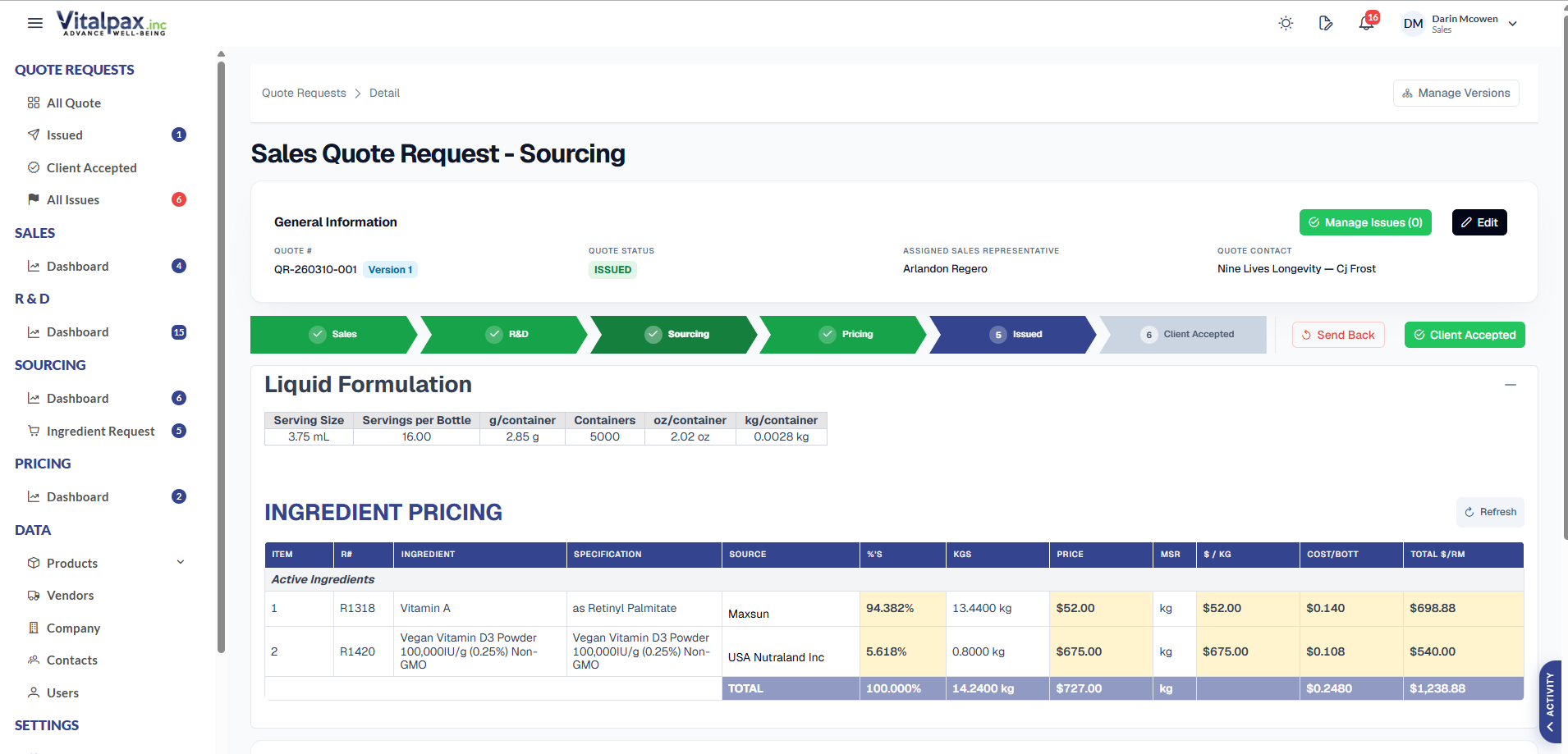
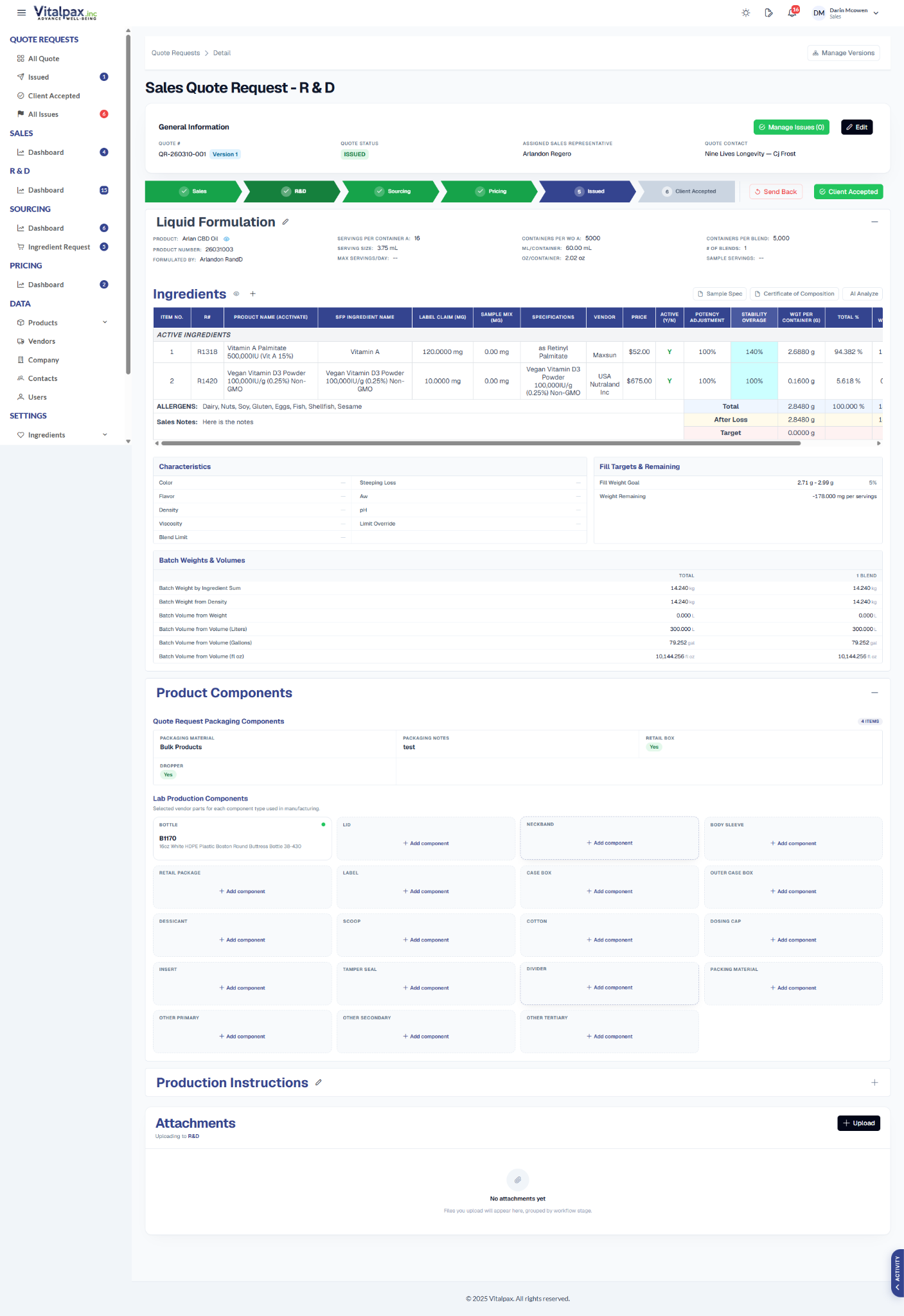
Quote Detail Tabs - Section Cards Everywhere
- Sales Tab Section Cards -- Sales tab now reads as four clear cards: Formula & Product Identity, Ingredients & Production, Packaging & Services, Attachments - each with a big brand-navy title and a per-section Edit jump-link.
- Deadlines + Mode Badges -- Completion Date shows a remaining-days line, Quantity Tiers moved above it, and a Basic / Advance mode badge sits on the Ingredients header (with the mode remembered per user).
- Consistent R&D / Sourcing / Pricing Tables -- All tables across R&D, Sourcing, and Pricing got a unified treatment - navy header, single-line borders, no thick double rules or stray lines, consistent font sizes.
- Cleaner Components Block -- R&D Product Components dropped the card-inside-a-card nesting, got slimmer subsection titles, and collapses by default so the page opens tidy.
UI / UX
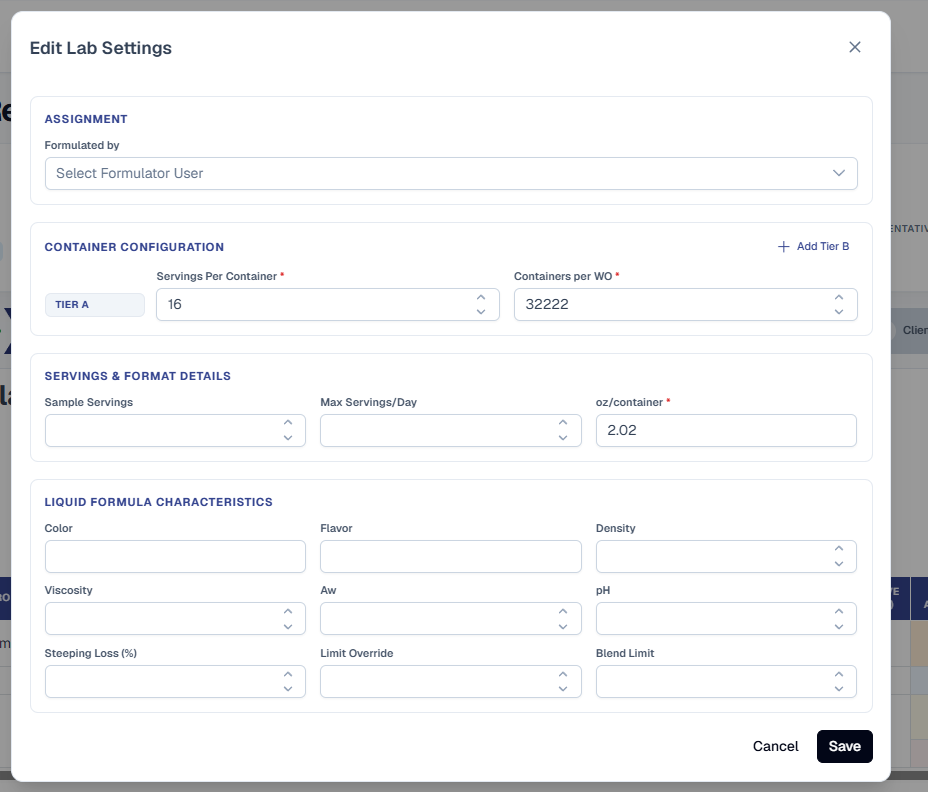
Edit Lab Settings Dialog - Cleaner Tier Editor
- Three Clear Sections -- Reorganized into Assignment, Container Configuration, and Servings & Format Details with a per-format Characteristics block (capsule / liquid / powder / tablet) at the bottom.
- Add Tier B / C / D in Place -- Add Tier button sits in the top-right of Container Configuration where you'd expect it. Each tier is its own row with a Tier badge, Servings per Container, Containers per WO, and an X to remove B/C/D.
- Aligned + Decluttered -- Tier badge is vertically aligned with its input row, empty Servings & Containers B-D no longer render, and the dialog's old horizontal scroll is gone.
UI / UX
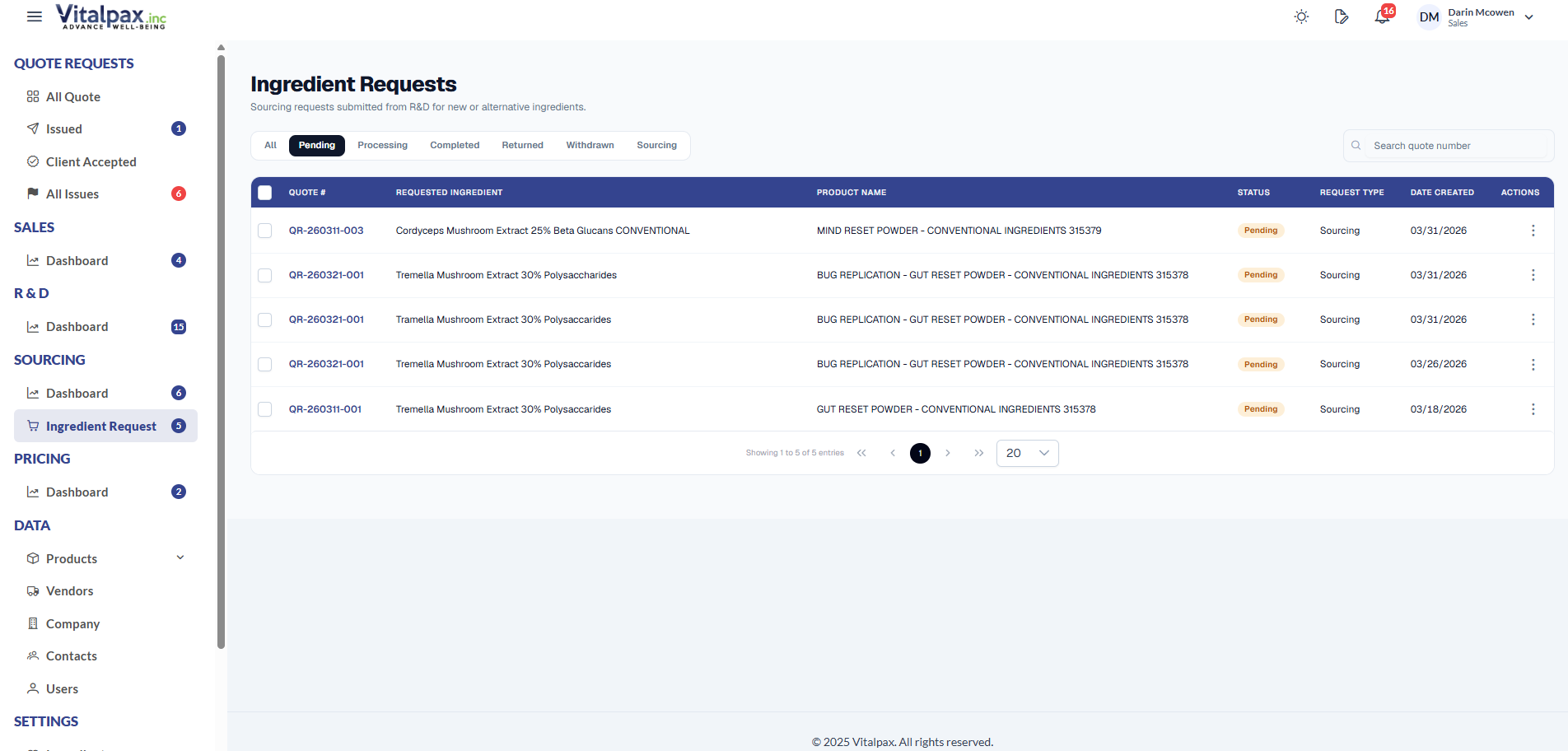
Ingredient Requests List - Compact + Faster
- Single-Row Header -- Page header, status tabs, and search bar now sit on the same row for a tighter, more compact layout.
- Status Tabs Right There -- All, Pending, Processing, Completed, Returned, Withdrawn, Sourcing - one click each, no filter dropdown.
- No More Horizontal Scroll -- Fixed column widths fit the screen: Quote # is compact, Requested Ingredient and Product Name flex to fill, and the Actions column is wide enough to show its label.
- Lighter Loading State -- Skeleton loader only fires on first load - switching tabs or paginating uses a lighter loading state so the page does not blank out every time.
UI / UX
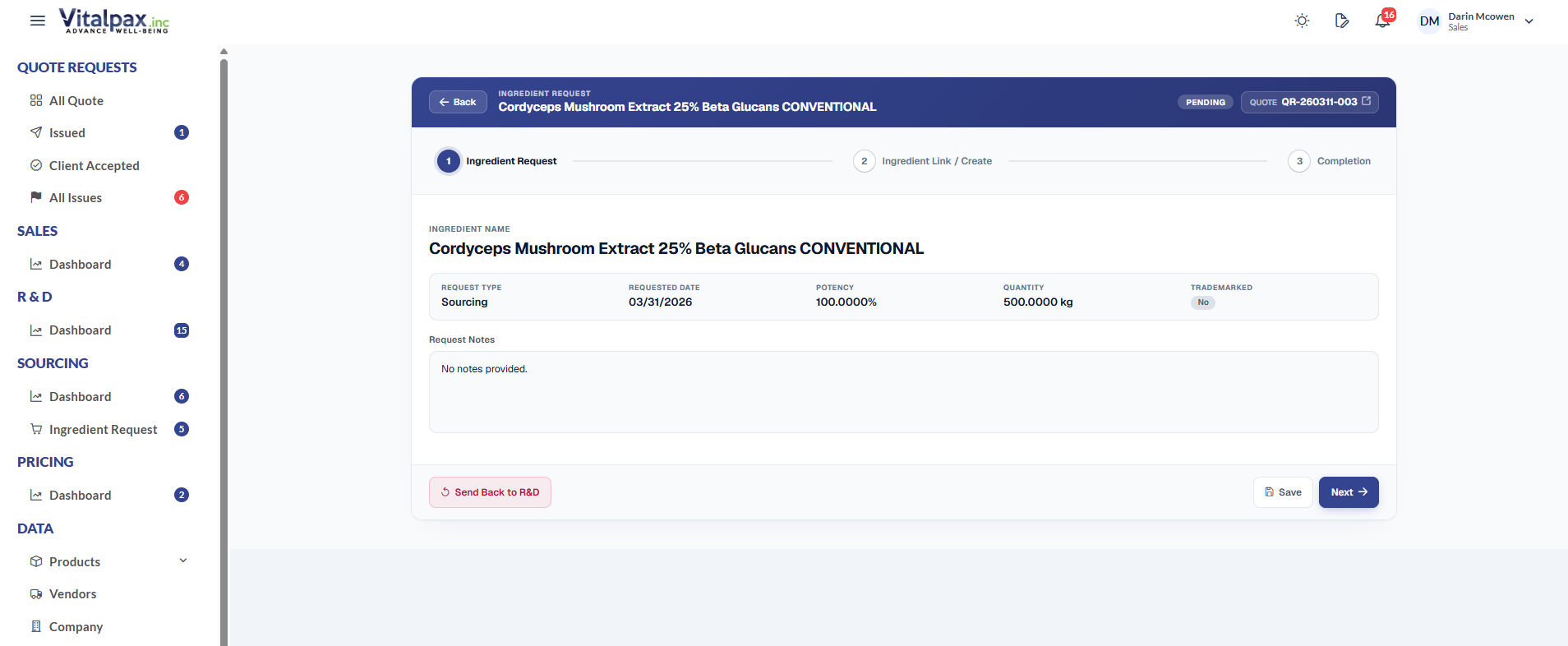
Ingredient Request Detail - 3-Step Rebuild
- Unified Header Card -- Single card with a navy header band: label, ingredient name, status pill, and a clickable Quote # link - replaces the old stacked panels.
- Yes / No Link Question -- Step 2 starts with one clean question - does this ingredient exist in our Acctivate database? Yes searches and links an existing product, No opens the Create New Ingredient form in a single grid.
- Final Summary on Step 3 -- Completion shows a clear review: ingredient name plus a Linking existing or Creating new chip, two-column Request vs Ingredient detail summary, the notes, and a compact attachment row.
- Restyled Stepper + Actions -- Future steps stay visible (not faded), active step is navy with a soft glow, completed steps turn green with a checkmark, and action buttons follow the brand: navy primary, emerald finish, soft outline secondary, soft rose for Send Back to R&D. Activity Log lives in a right-edge slide-in panel.
UI / UX
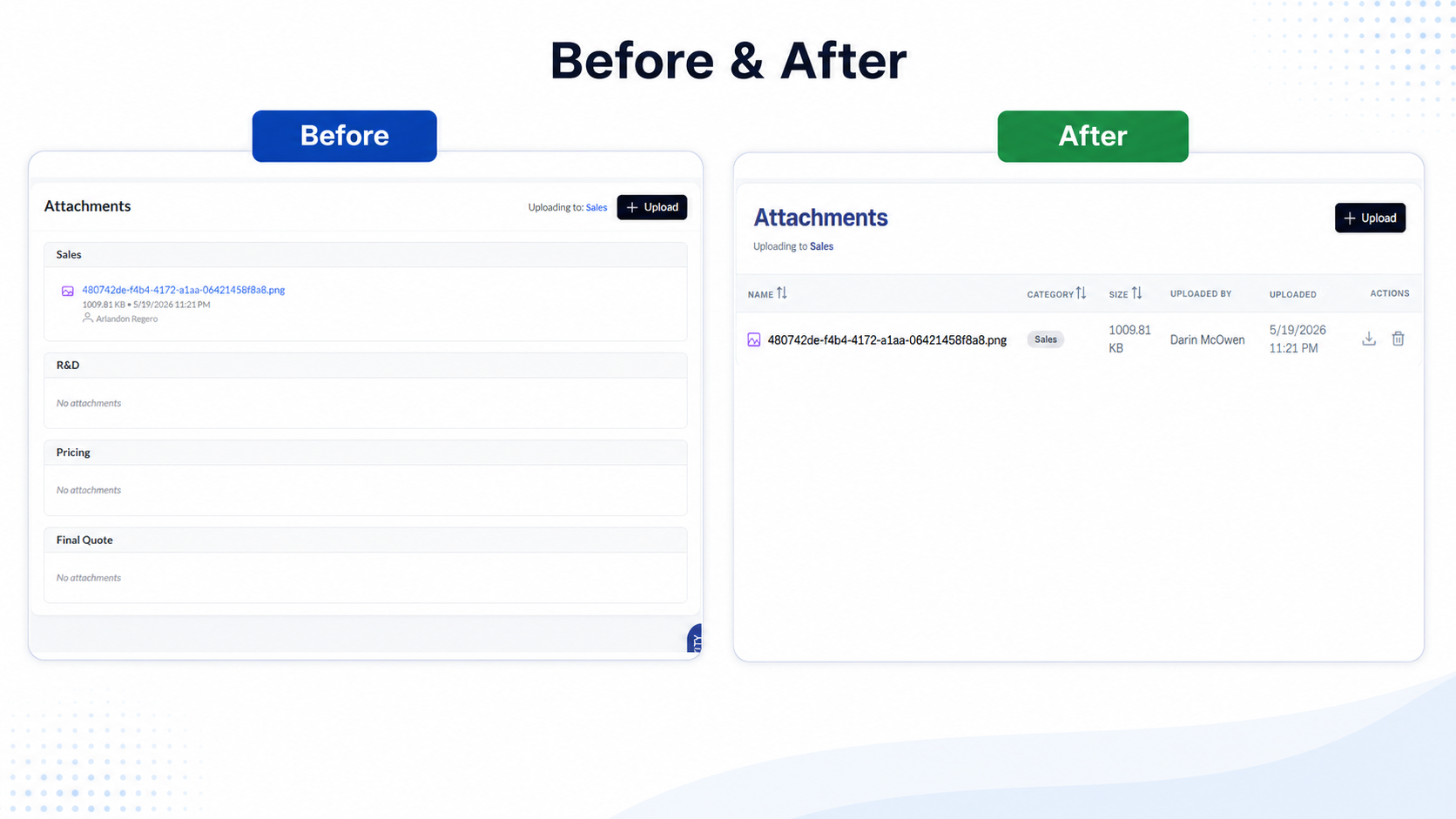
Compact Attachment Section
- Single Compact Row -- Attachment now renders as one tight row with an Optional pill - replaces the big drop-zone box that used to dominate the Step 2 layout.
- Same Upload, Less Real Estate -- Upload still works the same way, but it stops competing with the form fields for attention.
- Used Across the Detail Pages -- Pattern is reused everywhere the request detail used to nest huge attachment cards - R&D, Pricing, Final Quote sections all benefit.
Summary
What We Shipped
4
New Features
7
UI / UX Rebuilds
Customer-facing CoC + Spec Sheet + Facts panels go live, and the entire Quote Request and Ingredient Request experience gets a unified design language.