Quotation Tool CRM
Development Updates
Customer-facing documents go live - Certificate of Composition, Sample Spec Sheet, Supplement / Nutrition Facts, and a Master Product Specification - Purchasing gets a dedicated Sourcing workspace with a richer activity log, and the entire Quote Request and Ingredient Request experience is rebuilt with a unified design language.
May 6 - May 19, 2026
New Features &
Enhancements
A dedicated Sourcing workspace, a richer activity log, a Food / Supplement product type, and four customer-facing documents: Sample Spec Sheet, Supplement / Nutrition Facts, Certificate of Composition, and Master Product Specification.
Dedicated Sourcing Workspace for Purchasing
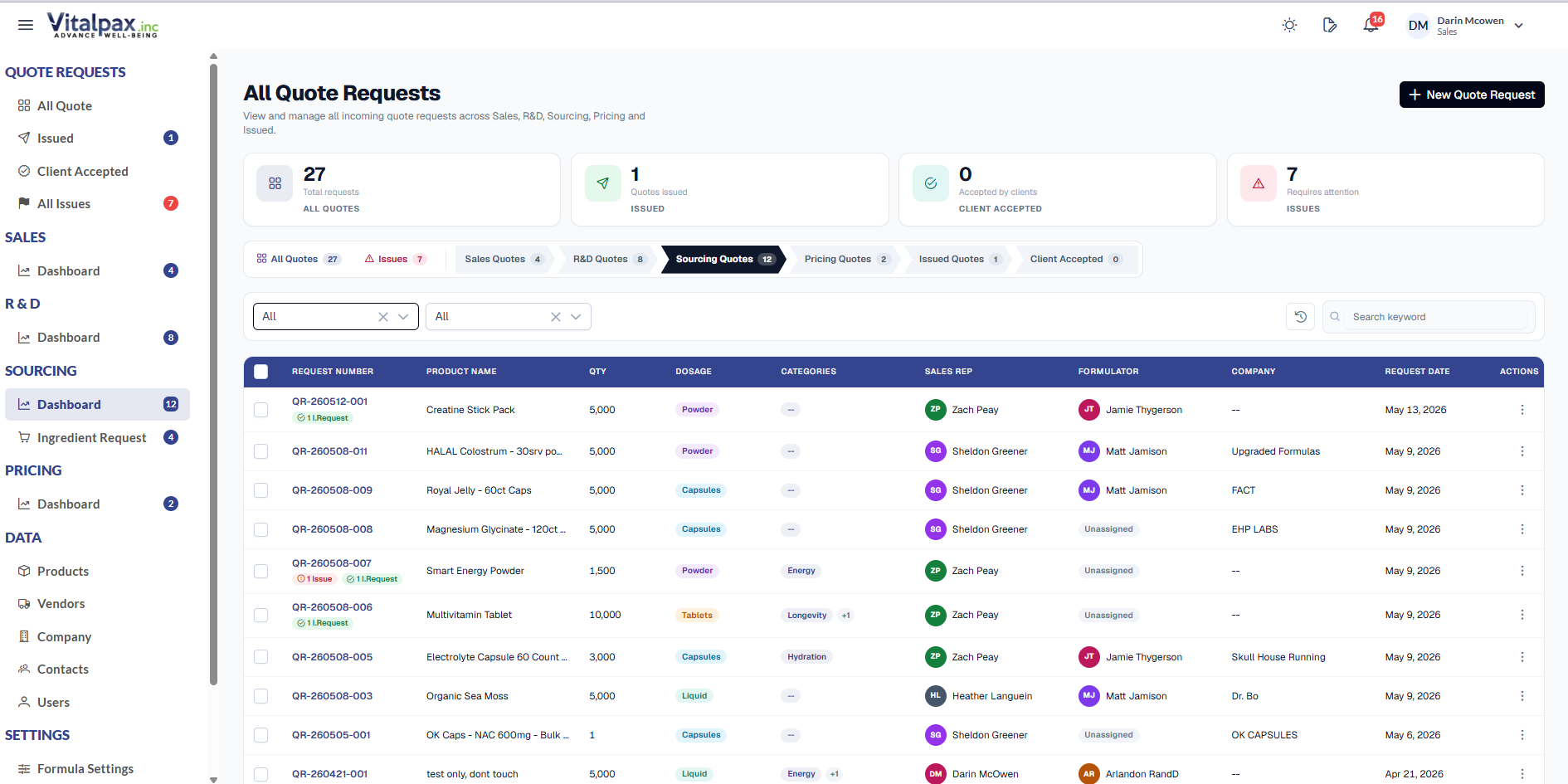
- New Sourcing Tab -- Purchasing now has its own Sourcing Quote Requests page with side nav under PURCHASING - Dashboard, separating sourcing activity from the rest of the quote flow.
- Review Requests Removed -- The old Review Requests page is gone - sourcing ownership moves fully into the new workspace.
- Pricing Read-Only on Vendors -- Pricing users no longer update ingredient pricing and vendors, but can still view vendor and PO data and edit product components and the final pricing summary.
Richer Activity Log Across the Quote Lifecycle
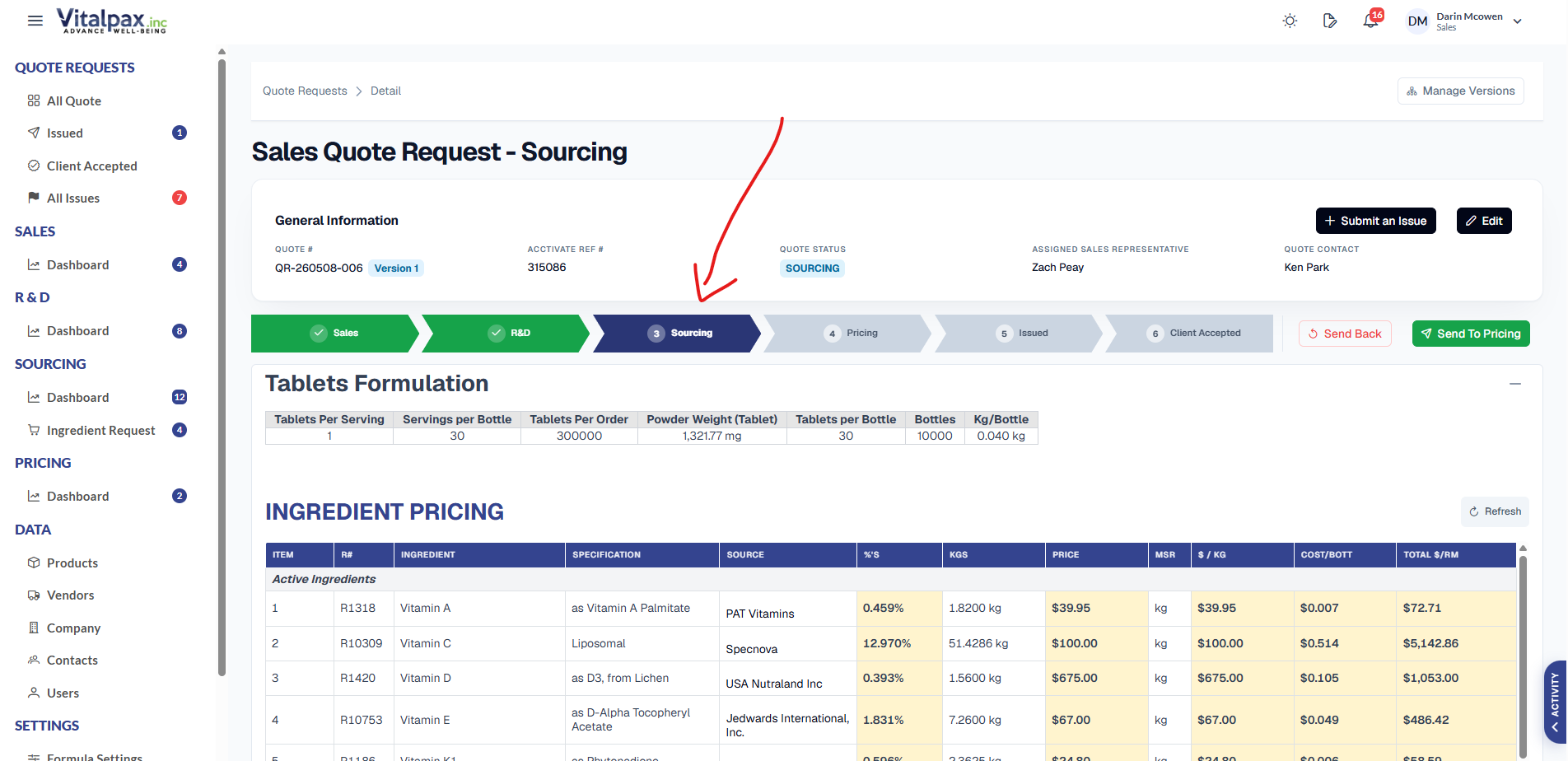
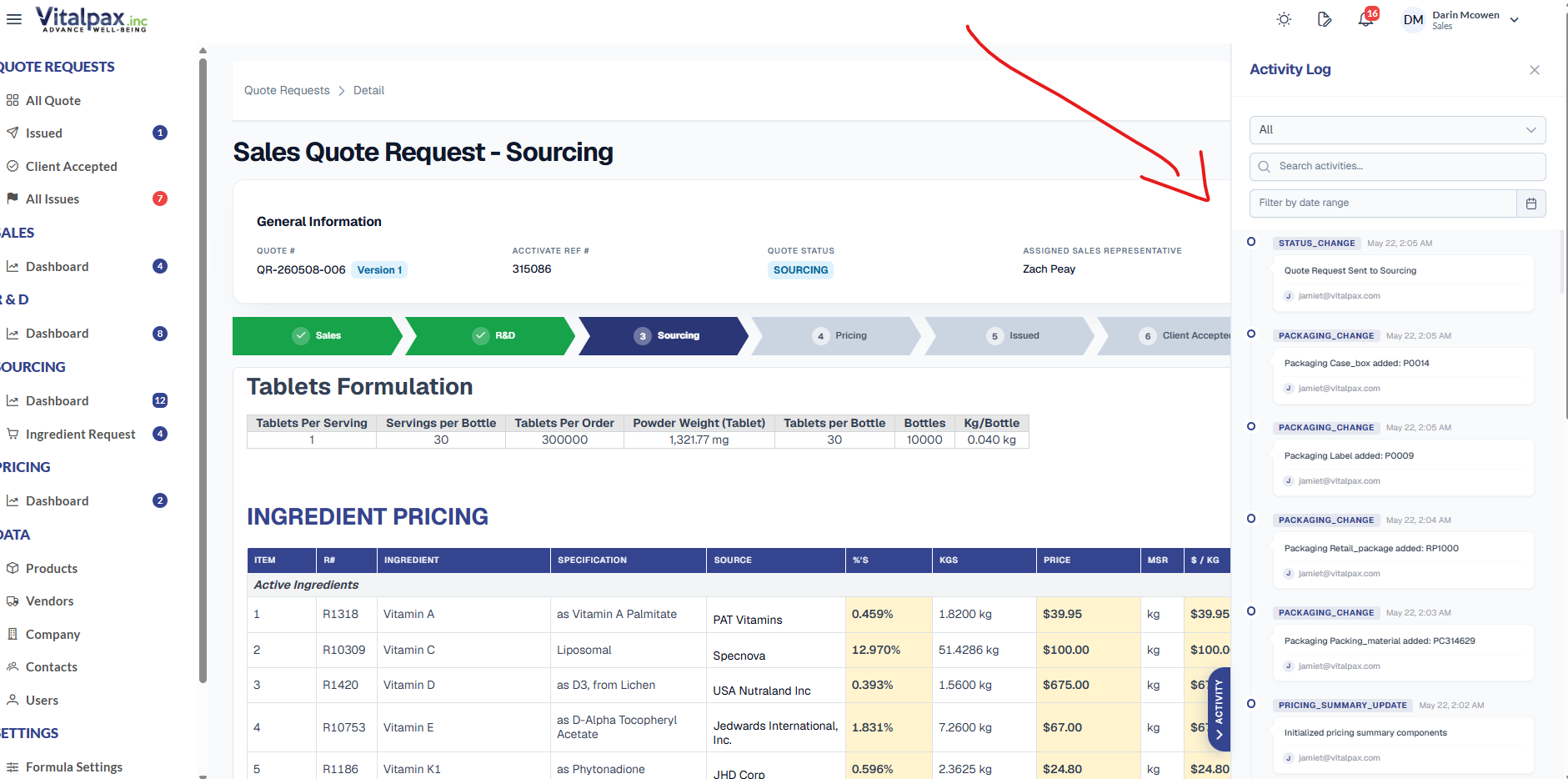
- Deeper Action Tracking -- Activity log now captures ingredient row changes, price updates, quote status movements, and product component edits - not just submissions.
- Tabs Are Status Filters -- Category tabs act as quote status filters defaulting to All, while still letting users drill into Sales, R&D, Sourcing, Pricing, or Issued.
- Slide-In Panel -- The log lives in a right-edge slide-in panel with a floating handle, so it never blocks the form while you trace exactly what changed.
Food vs Supplement Product Type
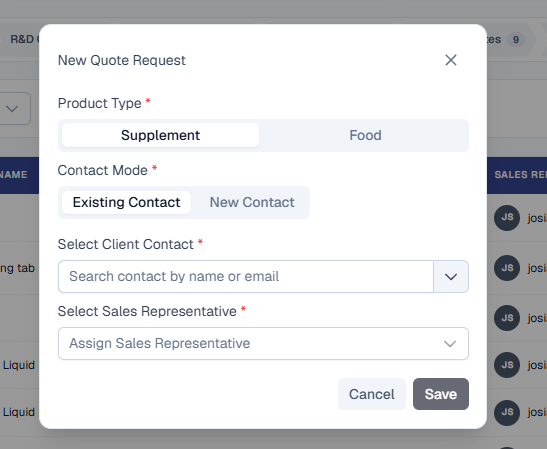
- Pick at Quote Creation -- New Quote Request dialog now opens with a Product Type toggle - Supplement or Food - before Contact Mode and assignment fields.
- Editable Later -- Edit Quote Request dialog carries the same Supplement / Food selector so the classification can be changed mid-quote if needed.
- Drives the Right Panel -- Classification determines whether the Nutrition Facts panel (Food) or Supplement Facts panel (Supplement) is shown and generated for that quote.
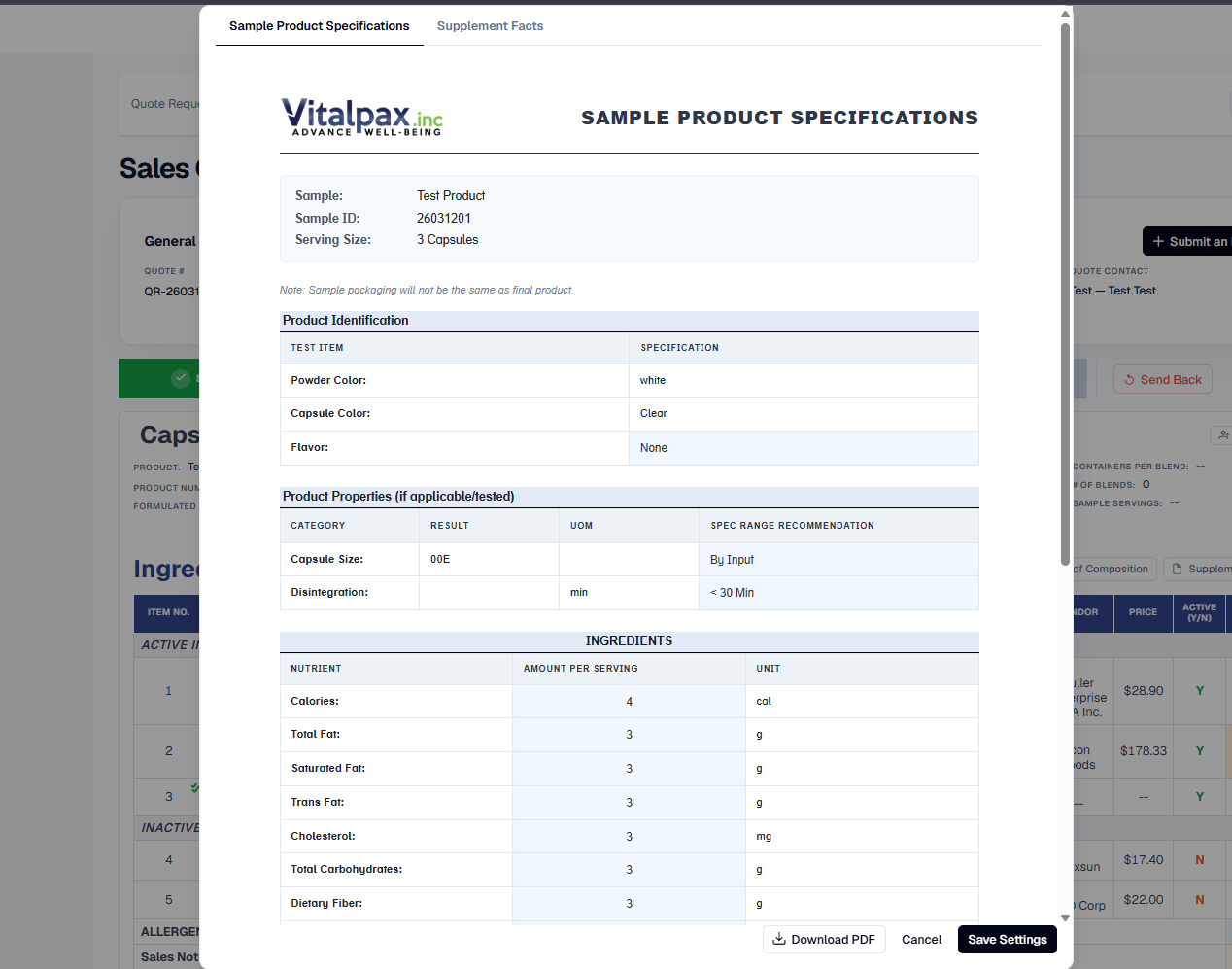
Sample Spec Sheet + Supplement / Nutrition Facts
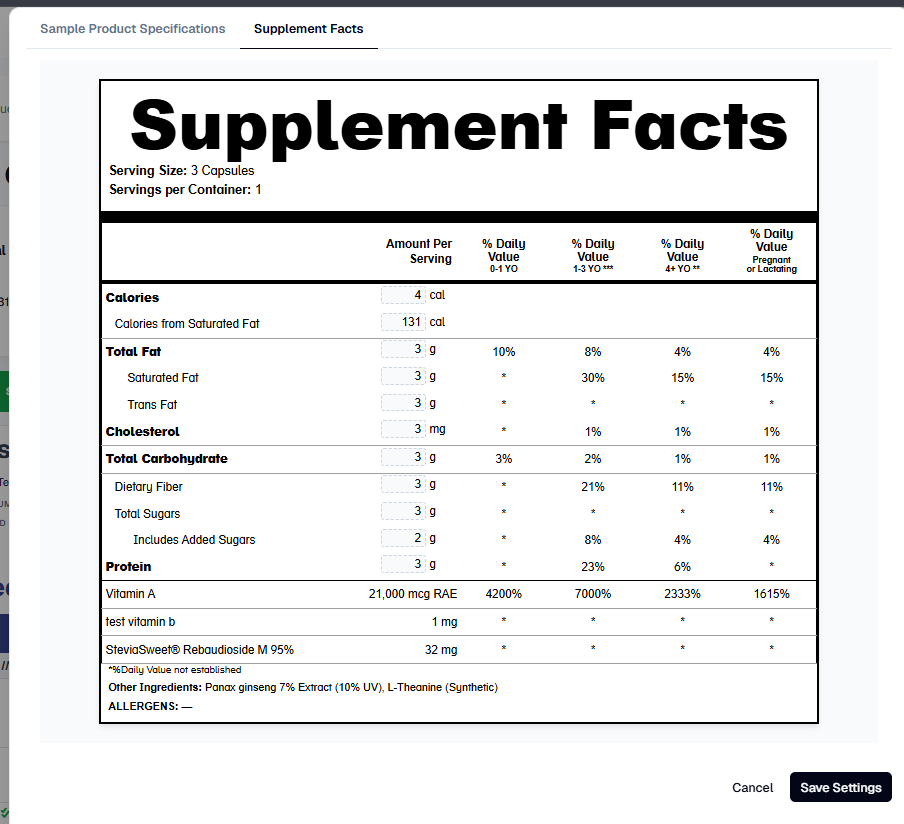
- Two-Tab Lab Preview -- Lab tab now hosts a Sample Product Specifications sheet and an interactive facts panel preview side-by-side in one dialog.
- Dynamic Panel Title -- Header switches between Supplement Facts and Nutrition Facts depending on whether the quote is classified as a supplement or food product.
- Age-Banded %DV -- The facts panel auto-calculates % Daily Value across four age columns: 0-1 YO, 1-3 YO, 4+ YO, and Pregnant or Lactating.
- Print-Ready + Sign-off -- Both sheets export to high-resolution PDF in one click, and the Spec Sheet captures Product Development and Sales approval dates plus customer feedback.
Certificate of Composition Sheet
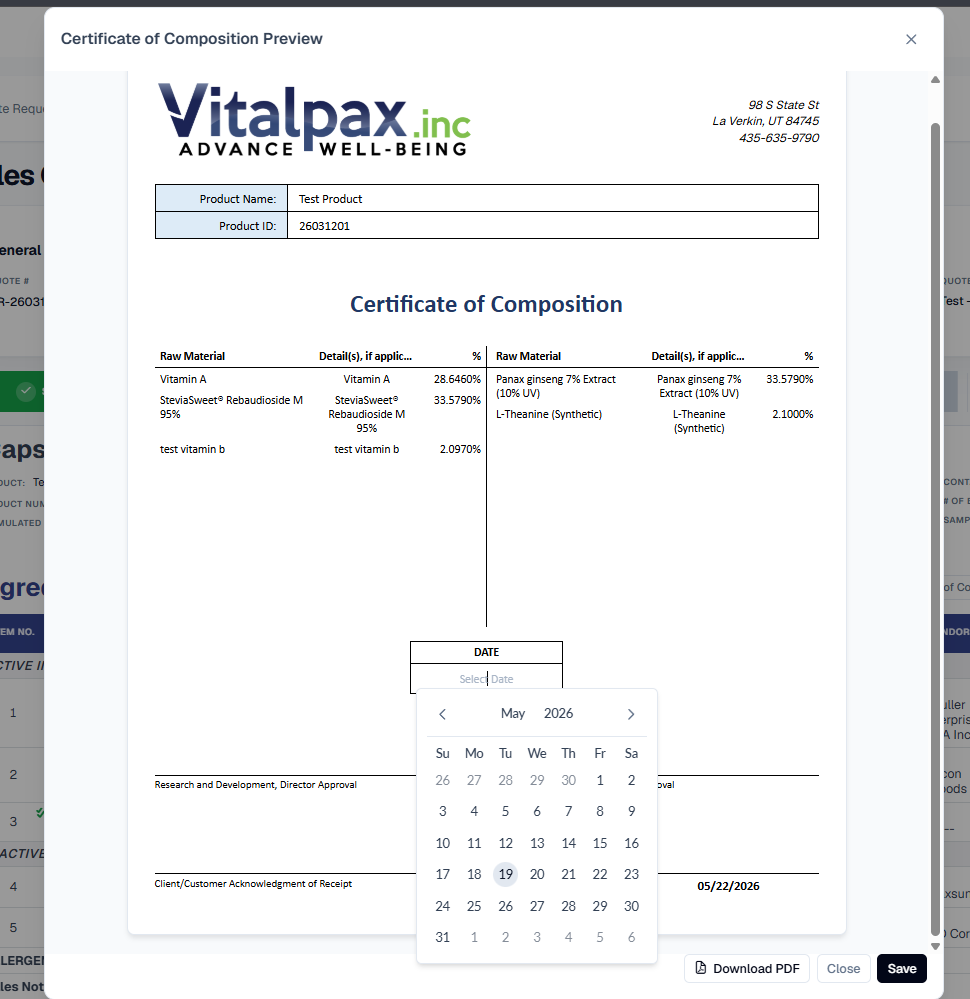
- Preview + PDF in R&D Tab -- Brand-new Certificate of Composition preview with a one-click PDF download lives directly on the R&D tab.
- Active / Inactive Split -- Page automatically separates active ingredients on the left and inactive ingredients on the right with raw material, detail, and percentage columns.
- Dates Saved In Place -- Certificate date and sign-off dates can be set, saved, and re-edited right from the preview - no separate settings screen.
- Standardized Filename -- Downloads come out as clean, high-resolution PDFs with a consistent name and date format ready to send to the customer.
Master Product Specification Sheet
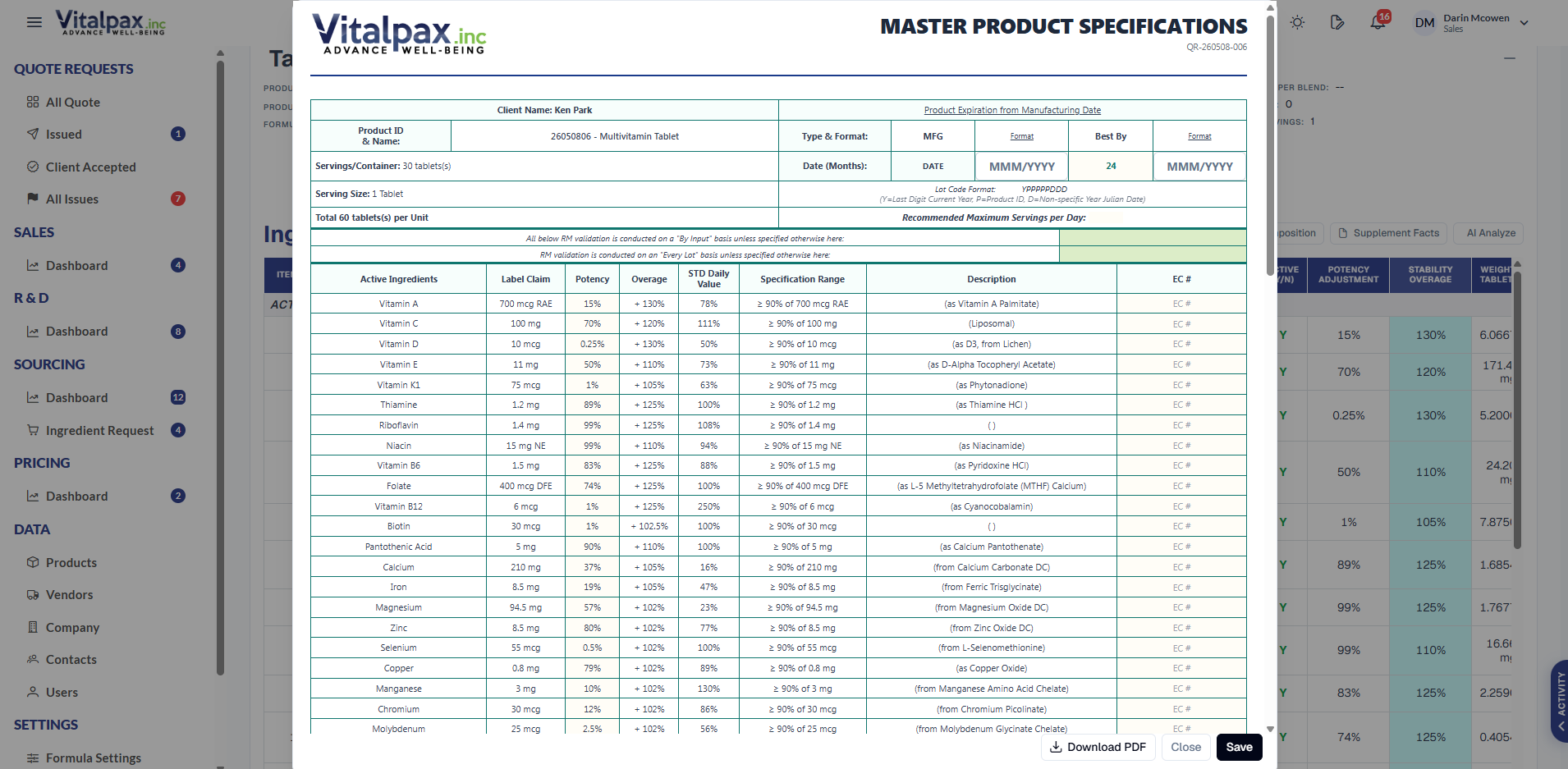
- New Master Spec Document -- A full Master Product Specifications sheet can now be generated for a quote, consolidating product identity, ingredients, and spec ranges in one document.
- One-Click PDF -- The sheet exports to a clean, print-ready PDF on the Vitalpax letterhead, ready to send to customers or hand to QA.
- Always Matches the Formula -- Pulls product identity, active ingredient amounts, and recommended spec ranges straight from the quote so the document never drifts from the formulation.
Frontend UI
Overhaul
Quote Requests list, per-tab content, the Edit Lab Settings dialog, the Ingredient Requests list, the Ingredient Request detail flow, and the attachment section all rebuilt with a unified design language.
Quote Requests List - Full Redesign
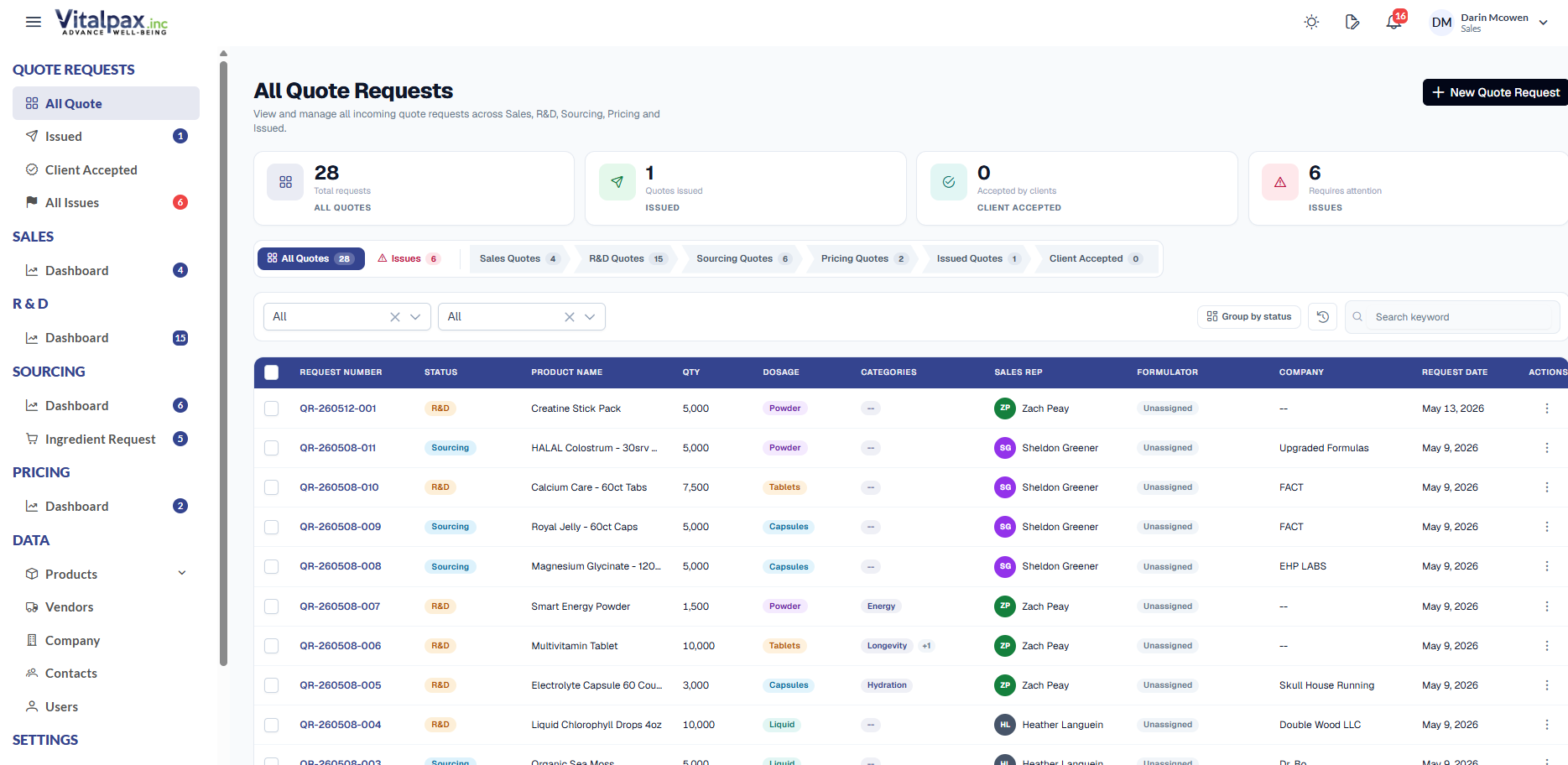
- Arrow-Pill Status Tabs -- New top tab strip with arrow-shaped pills: All Quotes, Issues, Sales, R&D, Sourcing, Pricing, Issued, C-Accepted (shortened so it always fits).
- Quick-Glance Stat Cards -- All Quotes / Issued / Client Accepted / Issues cards stay accurate on every tab, and the Issues counter now reflects every issue system-wide, not just on-screen quotes.
- Server-Side Tab Loading -- Each tab fetches only what it needs, so the page stays fast even with thousands of quotes, with a skeleton loader on every tab switch.
- Refined Table + Badges -- Navy header, tighter widths, Customer column removed, shorter Product Name, aligned +2 categories badge, and a softer status palette (navy / amber / sky / purple / green / teal / slate).
Quote Detail Tabs - Section Cards Everywhere
- Sales Tab Section Cards -- Sales tab now reads as four cards - Formula & Product Identity, Ingredients & Production, Packaging & Services, Attachments - each with a brand-navy title and a per-section Edit jump-link.
- Deadlines + Mode Badge -- Completion Date shows a remaining-days line, Quantity Tiers moved above it, and a Basic / Advance mode badge sits on the Ingredients header (remembered per user).
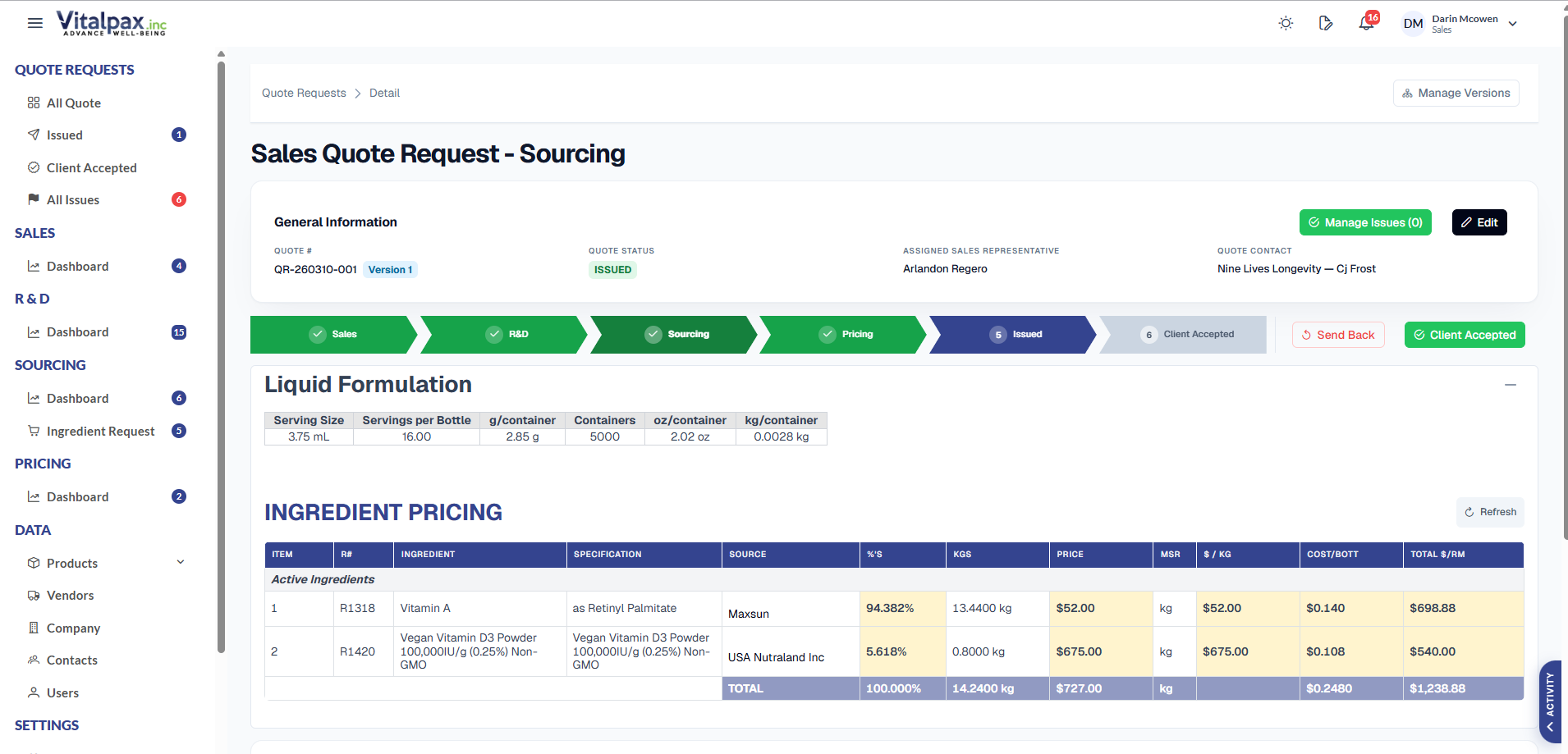
- Unified R&D / Sourcing / Pricing Tables -- All tables got a single navy-header treatment - single-line borders, no thick double rules or stray lines, consistent font sizes.
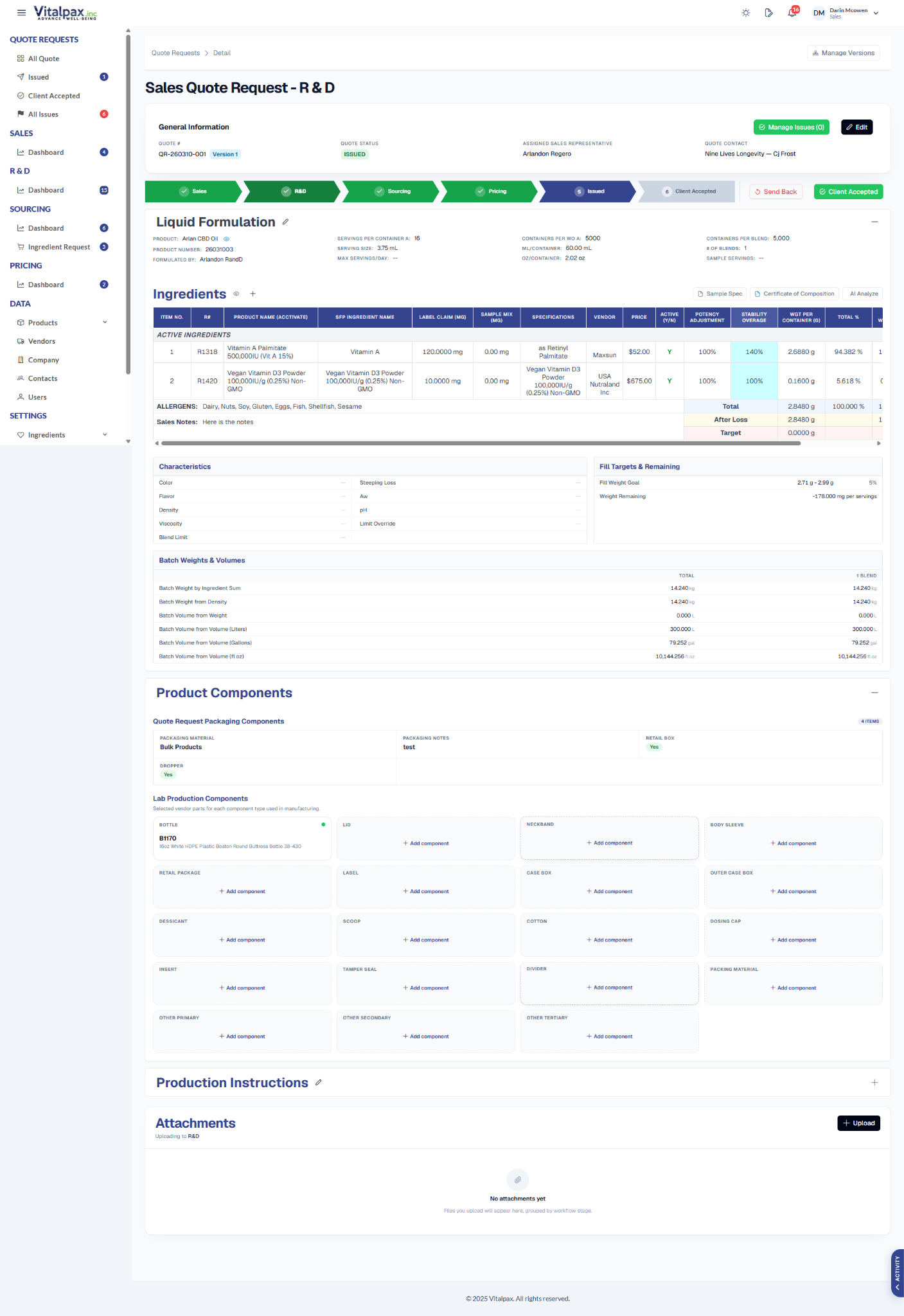
- Cleaner Components Block -- R&D Product Components dropped the card-inside-a-card nesting, got slimmer subsection titles, and collapses by default so the page opens tidy.
Edit Lab Settings Dialog - Cleaner Tier Editor
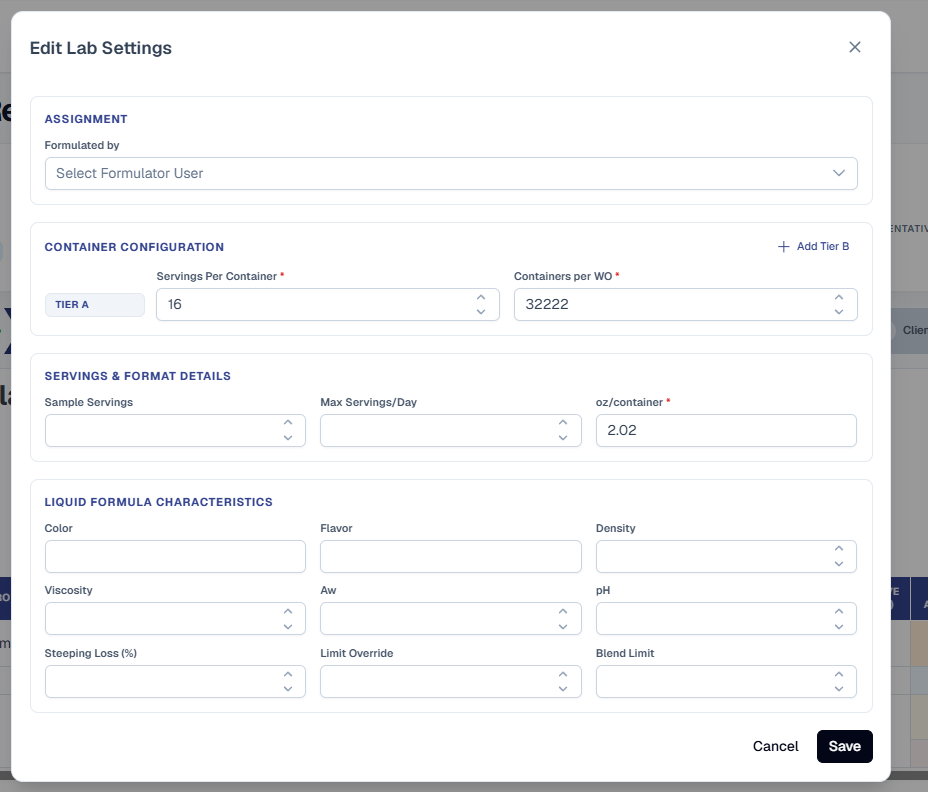
- Three Clear Sections -- Reorganized into Assignment, Container Configuration, and Servings & Format Details with a per-format Characteristics block (capsule / liquid / powder / tablet) at the bottom.
- Add Tier In Place -- The Add Tier B / C / D button sits in the top-right of Container Configuration. Each tier is its own row with a Tier badge, Servings per Container, Containers per WO, and an X to remove B/C/D.
- Aligned + Decluttered -- Tier badge is vertically aligned with its input row, empty Servings & Containers B-D no longer render, and the old horizontal scroll is gone.
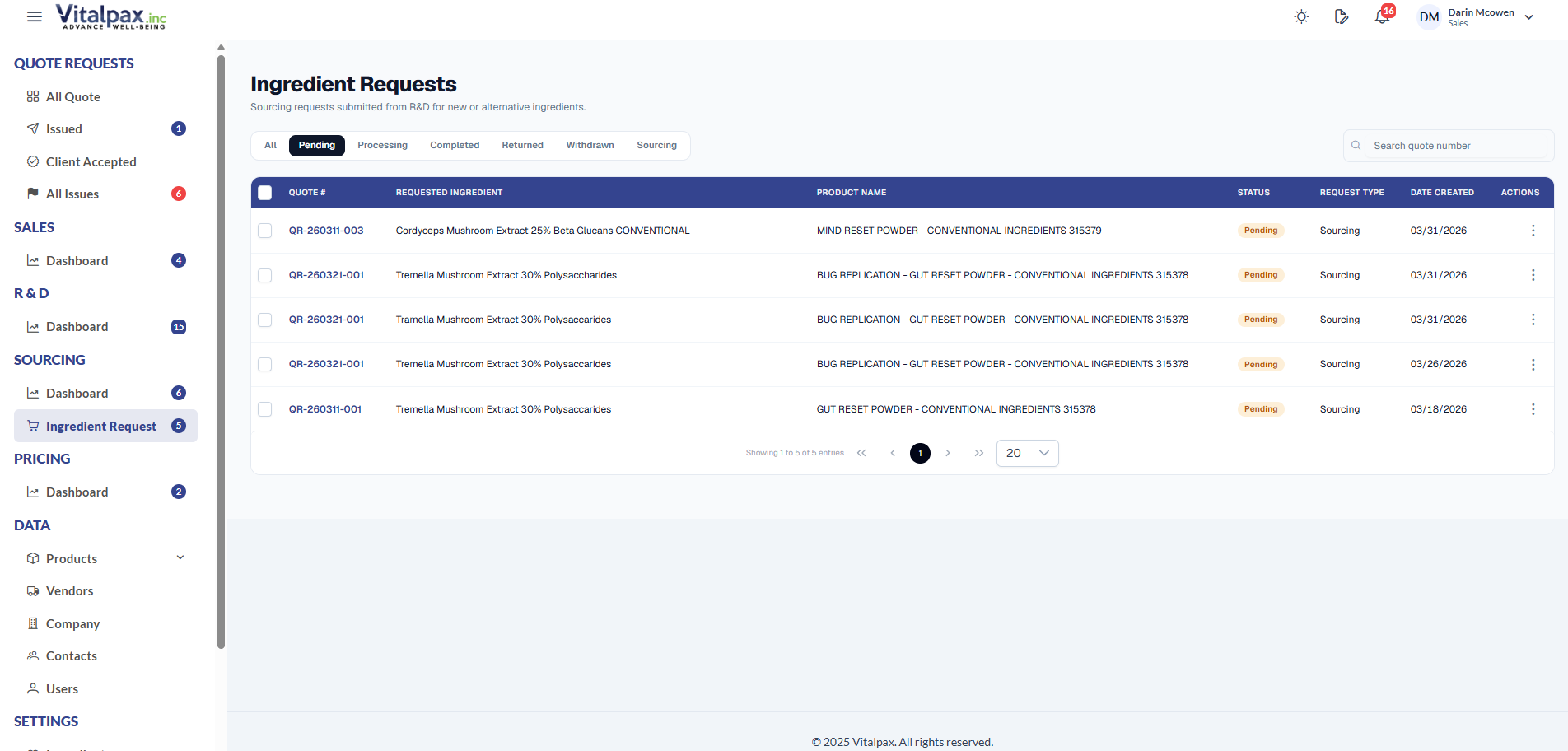
Ingredient Requests List - Compact + Faster
- Single-Row Header -- Page header, status tabs, and search bar now sit on the same row for a tighter, more compact layout.
- Status Tabs Right There -- All, Pending, Processing, Completed, Returned, Withdrawn, Sourcing - one click each, no filter dropdown.
- No More Horizontal Scroll -- Fixed column widths fit the screen: Quote # is compact, Requested Ingredient and Product Name flex to fill, and the Actions column is wide enough to show its label.
- Lighter Loading State -- Skeleton loader only fires on first load - switching tabs or paginating uses a lighter state so the page does not blank out every time.
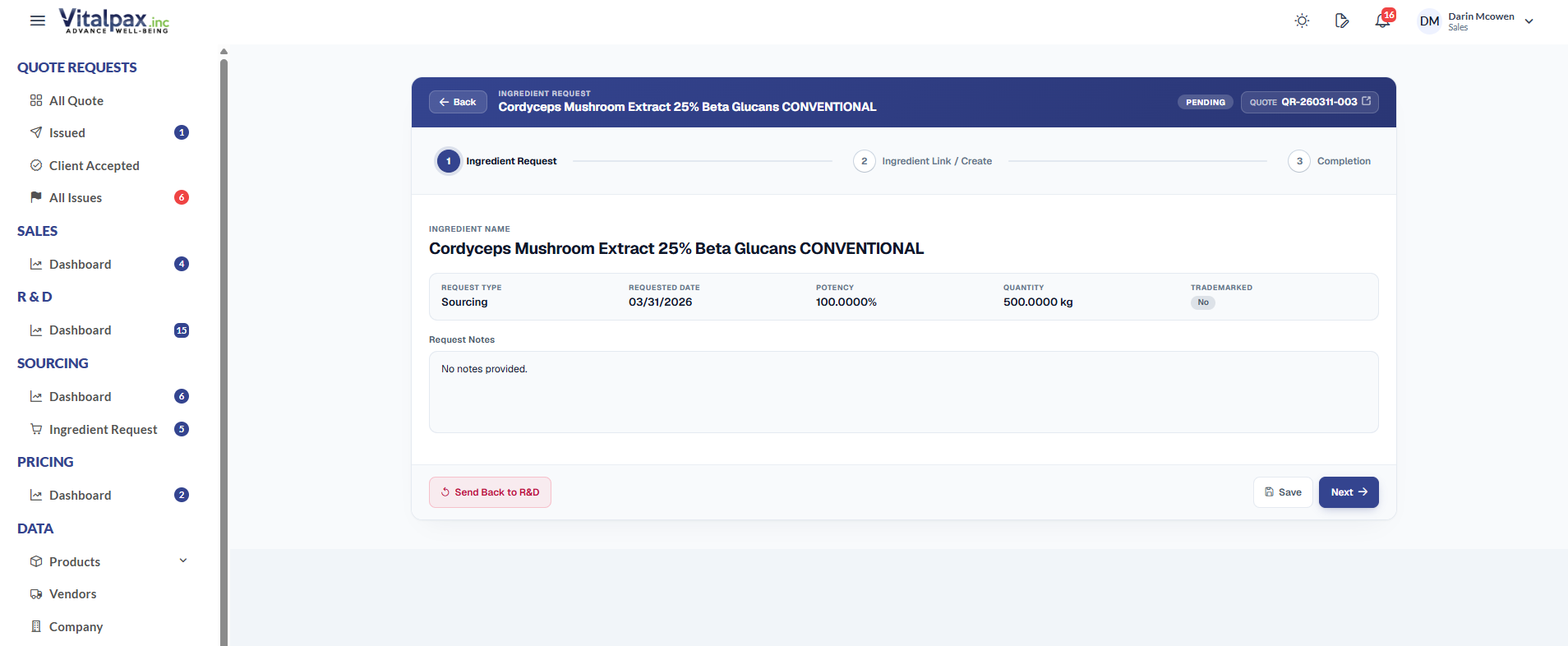
Ingredient Request Detail - 3-Step Rebuild
- Unified Header Card -- A single card with a navy header band - label, ingredient name, status pill, and a clickable Quote # link - replaces the old stacked panels.
- Yes / No Link Question -- Step 2 starts with one clean question - does this ingredient exist in our Acctivate database? Yes searches and links an existing product, No opens the Create New Ingredient form in a single grid.
- Final Summary on Step 3 -- Completion shows the ingredient name plus a Linking existing or Creating new chip, a two-column Request vs Ingredient summary, the notes, and a compact attachment row.
- Restyled Stepper + Actions -- Future steps stay visible, the active step is navy with a soft glow, completed steps turn green with a checkmark, and actions follow the brand - navy primary, emerald finish, soft rose for Send Back to R&D.
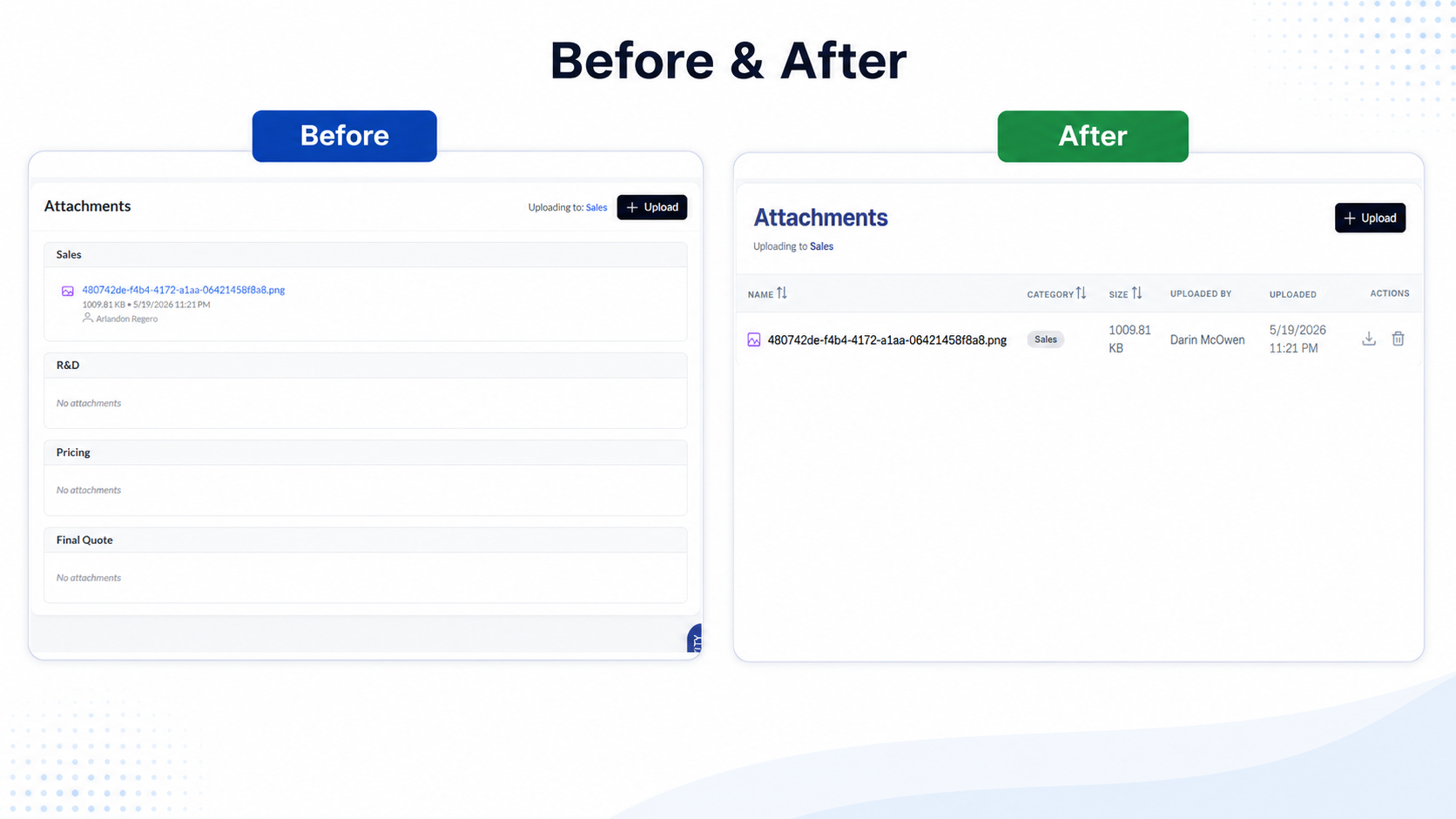
Compact Attachment Section
- Single Compact Row -- The attachment now renders as one tight row with an Optional pill - replacing the big drop-zone box that used to dominate the layout.
- Same Upload, Less Real Estate -- Upload still works exactly the same way, but it stops competing with the form fields for attention.
- Reused Everywhere -- The pattern replaces the stacked Sales, R&D, Pricing, and Final Quote attachment cards across the detail pages.
What We Shipped
Four customer-facing documents go live, Purchasing gets its own Sourcing workspace with a richer activity log, and the entire Quote Request and Ingredient Request experience is reimagined with a unified design language.